


Harbor Freight Tools
4.716.75K Reviews
App Specs
- Version
- 11.22.0
- Updated On
- License
- Free
- Downloads
- 1,000,000+
- Developer
- Harbor Freight Tools USA, Inc.
- Categories
- Shopping
- Platform
- Android, iOS
Screenshots
 Analysis by AppCompare
I tend to open a tool-shopping app when I have a specific job in mind, not because I want to spend an afternoon scrolling. That makes Harbor Freight Tools most useful when I’m comparing a few practical options, checking a coupon, or trying to figure out whether a nearby store is worth visiting. It’s a free shopping app from Harbor Freight Tools USA, Inc., focused on the retailer’s tools and related gear. My overall impression is that it’s a handy companion to shopping with the company, especially if I already know what I need; it is less compelling if I’m looking for a broad, independent comparison across many retailers.
What to expect when opening it
For a shopping app, speed matters most when I’m checking something on the move: a product detail, a deal, or whether a store might have what I need. The experience is oriented around browsing the retailer’s own catalog rather than serving as a general-purpose tool guide. That focus helps keep the task straightforward, but it also means the app is most valuable when Harbor Freight is already one of the places I would consider shopping.
I would treat it as a useful starting point, not a guarantee that every step will feel instant on every phone or connection. Catalog browsing can involve more waiting than opening a simple list, particularly when I’m moving between categories and product details. A practical habit is to look up likely options before leaving home, while I have time to compare them, rather than relying on last-second research in a store aisle.
When browsing becomes a real shopping task
The app is a better fit for planned purchases than for aimless browsing. If I’m gathering supplies for a weekend repair, I can use it to narrow down the kind of tool I want, review the available product information, and check whether a coupon might affect what I choose. That sequence is more useful than simply collecting discounts: it keeps the project requirements in view so I don’t let a deal distract me from buying the right tool.
For example, imagine I’m preparing to fix a wobbly shelf after work. I can check the app at home, compare suitable options, and see whether a nearby store is worth a stop on the way back. If I’m unsure about a product, I can pause rather than buy in a rush. The app helps organize that decision, though I’d still verify the details that matter for the job before setting out.
Reliability and the role it plays
I see this as a retail companion, not something a project depends on once work has begun. That distinction matters: if I need a tool urgently, it’s sensible to check the information ahead of time and keep a backup plan, such as calling or visiting a store if the app doesn’t settle the question. An app can make shopping easier, but it cannot remove the uncertainty that comes with changing stock or a rushed trip.
It also helps to separate product research from buying confidence. A product page can make comparisons easier, yet the right choice still depends on the task, the materials, and how often I expect to use the tool. For occasional household repairs, convenience and cost may carry more weight; for repeated professional use, I would spend longer checking whether a particular option suits the workload rather than letting an in-app offer make the decision for me.
Worth Reading Before You Choose

EA SPORTS FC Mobile 26 Is a Bigger Football Game, but It Takes Time

Flipboard Shows What News Apps Must Do Beyond the Feed

Switching to Android Auto Means Rethinking Your Driving Routine

Google Calendar Makes a Crowded Week Easier to Manage

Ludo King Makes the Most of the Minutes Between Plans

Baby Panda World Brings Quick Play to Modern Phones, but Its Game Library Feels Busy
Who will get the most from it
The strongest audience is someone who shops at Harbor Freight often enough to benefit from having its catalog and offers close at hand. DIYers planning a home project can use it to prepare a shortlist, while tradespeople may find it useful for checking the retailer’s selection before making a separate trip. The app is also a reasonable choice for a shopper who prefers to research on a phone but still wants to make the final purchase in person.
On the other hand, I would skip it as my main research tool if I wanted neutral comparisons across brands and stores. A retailer’s own app naturally centers that retailer’s inventory; for wider price checking or independent buying advice, a general shopping search or specialist review source is a better companion. That is not a flaw so much as a boundary: this app works best when I know why I’m looking at Harbor Freight in the first place.
Exploring the Features
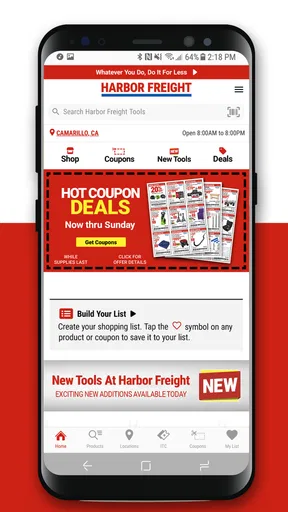
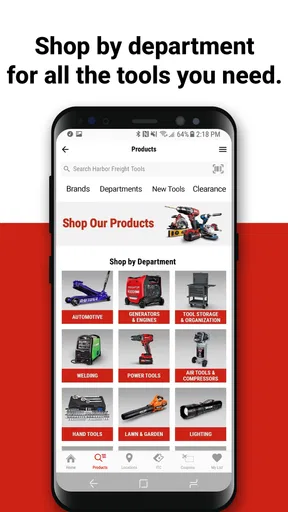
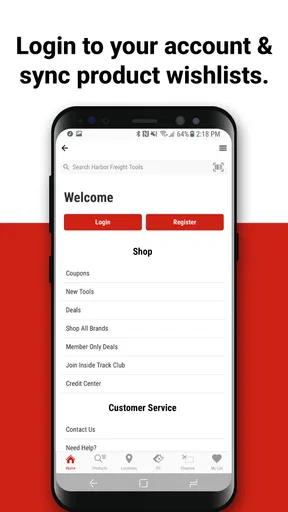
First off, the Harbor Freight Tools app is super intuitive. From the moment you open it, you’ll notice how user-friendly the interface is. It’s like wandering through an actual store, but without the hassle of leaving your couch. The home screen offers quick access to a variety of categories, from hand tools to power tools, and even some pretty sweet deals that you don’t want to miss.
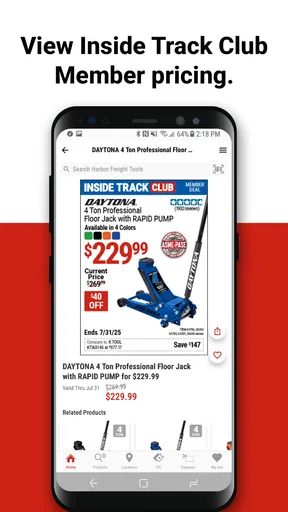
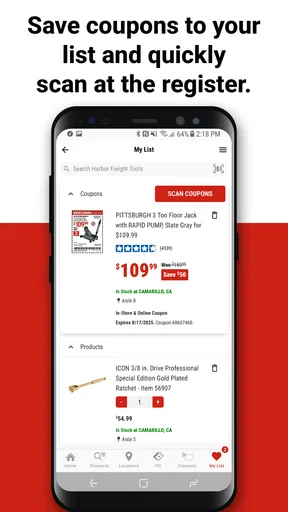
One feature I absolutely love is the coupons section. You have the opportunity to snag bargains with just a click. The app regularly updates these coupons, so it’s worth checking in often. There’s even a favorites feature, where you can save items you’re interested in for easy access later. Perfect for those of us who love to window shop before committing!
Shopping Experience
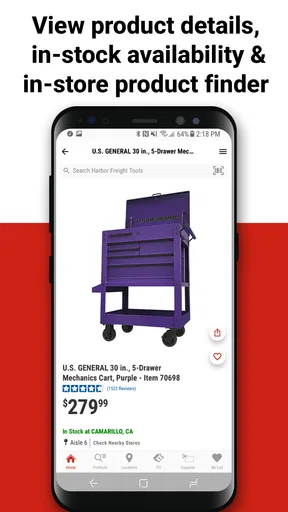
Browsing through the app is as smooth as butter. Each product page is packed with all the juicy details you need: specifications, customer reviews, and availability. You can even check if a particular tool is available in a store near you, which is a lifesaver if you’re in a pinch and need something ASAP.
What really stands out is the search functionality. It’s powerful and precise, allowing you to filter results by brand, price, and even ratings. So if you’re hunting for a specific item or just want to explore within a certain budget, the app has got your back.
Using offers without letting them drive the purchase
In my experience, coupons are most helpful when I already have a clear idea of the item or type of tool I need. I’d check the offer, then compare the relevant product details and total shopping plan instead of browsing discounts first. That small change in order makes it easier to avoid buying something merely because it appears to be a bargain. For a larger project, I’d save possible items to favorites while I work out the full list, then revisit the list before heading to a store.
Favorites can also serve as a lightweight planning aid. I can keep a couple of candidates together while deciding what best fits a job, rather than trying to remember product names later. It is not a substitute for a detailed project inventory, but it can reduce repeated searching when I’m comparing options over several sessions. If I’m buying for a one-off repair, I’d still make a separate note of the parts and supplies the tool alone won’t cover.
Search, comparison, and the limits of a retailer catalog
Search and filters are useful when I have a starting point, such as a tool type, brand, or budget. They can narrow the retailer’s own selection, which is a different job from proving that one product is best across the market. I’d use the app to create a shortlist, then consider whether the specifications match the material and workload I have in mind. If I’m unsure what kind of tool a task requires, broad product research elsewhere should come first.
A good comparison is not always the one with the most filters. For a quick household job, I may care more about whether a suitable option is available nearby than about examining every alternative. For frequent professional use, I’d slow down and compare the details that affect durability and suitability, rather than letting a low price or a high customer rating settle the question by itself. The app can help me gather information, but judgment still belongs to the shopper.
Customer Service at Your Fingertips
We’ve all been there—stuck with a question or an issue while shopping online. The app provides a seamless way to contact customer service. Whether it’s through live chat or direct call options, help is just a tap away. Plus, their FAQs section is pretty comprehensive, answering most of the questions you might have.
And hey, if you’re someone who prefers face-to-face interactions, the app offers a store locator feature. This helps you find the nearest Harbor Freight store, complete with operating hours and directions. It’s like having a personal assistant in your pocket.
Planning a store visit and handling uncertainty
The locator is most useful as a trip-planning tool: I can identify a nearby branch, check its listed hours, and decide whether an in-person conversation would be easier than continuing to research on my phone. If the purchase is time-sensitive, I would check the relevant product information before travelling and contact the store when certainty matters. Seeing a location in the app is convenient, but it is not the same thing as having the item physically confirmed for my visit.
That extra check is particularly worthwhile when I’m making a special trip or need one particular item to finish a repair. For a casual browse, a quick look at nearby locations may be enough; for a job that cannot wait, I would not build the whole plan around an assumption. This is a sensible trade-off for a store-focused app: it helps me organize the next step, while I remain responsible for confirming details that could change.
Performance on different phones
The app’s practical value depends partly on how I use it and on the phone in my hand. Looking up one item and checking a store is a lighter task than repeatedly opening product pages, comparing many candidates, and moving between categories. If I’m using an older device or a poor connection, I’d keep the session focused and do the deeper browsing when I have a steadier connection. I would not treat a moment of sluggishness as proof that the app is unusable, but neither would I rely on it as my only source of information during a time-critical errand.
Harbor Freight Tools is free, rated for Everyone, and has an average rating of 4.7 from around 56,000 ratings, with more than 1 million installs. Its current version is 11.21.0, and it requires Android 8.0 or later. Those details make it an accessible option for many Android shoppers, though the best test is whether it works comfortably on your own device and for the way you shop. I’d keep the app updated through the usual store process and reopen it if a page does not load as expected, rather than assuming a failed first attempt means the information is unavailable.
Final Thoughts
All in all, the Harbor Freight Tools app is a robust platform for tool enthusiasts. Whether you’re a professional contractor or a weekend DIY warrior, this app offers a convenient, efficient way to shop for tools. It’s not just about buying; it’s about enhancing your entire shopping experience with its user-friendly design and practical features.
So, if you haven’t already, give this app a shot. You might just find that perfect tool you’ve been looking for or score that deal you didn’t know you needed. Happy shopping, and may your next project be a smashing success!
My practical verdict
I’d recommend it to Harbor Freight shoppers who want to browse the retailer’s tools, keep possible purchases together, look for coupons, and plan a store visit without starting from scratch each time. Its strongest use is preparation: decide what the job requires, compare a short list, and then use the app to make the shopping step more convenient. That approach makes the offers and store information more useful than simply opening the app and hoping a deal tells me what to buy.
I would choose another resource when I need impartial, cross-store research, or when a project is complex enough that I need detailed advice before picking a tool. For those situations, the app can still be one stop in the process, but it should not be the whole process. Used with realistic expectations, it is a practical free addition for regular customers; used as a substitute for careful product selection or confirmation of an urgent purchase, it can leave me with questions that a retailer catalog alone cannot answer.
Pros
- Wide range of tools available.
- Frequent discounts and sales.
- User-friendly interface.
- Easy account management.
- Fast checkout process.
Cons
- Limited customer support options.
- Some tools lack detailed descriptions.
- Occasional app crashes reported.
- In-app ads can be intrusive.
- Limited international shipping.
FAQs for Harbor Freight Tools
What features does the Harbor Freight Tools app offer?
The Harbor Freight Tools app provides users with a variety of features to enhance their shopping experience. This includes a comprehensive product catalog, real-time inventory checks, exclusive online coupons, and a store locator. The app also allows users to track orders and receive notifications about special promotions and sales events.
Is the Harbor Freight Tools app free to download and use?
Yes, the Harbor Freight Tools app is free to download from both the Google Play Store and the Apple App Store. Users can access most features without any cost, although some in-app purchases or premium content may be available for advanced functionalities or exclusive deals.
How user-friendly is the Harbor Freight Tools app?
The app is designed with user convenience in mind, offering an intuitive interface that is easy to navigate. Categories are clearly organized, making it simple to find specific tools or deals. Customer reviews and ratings are integrated to help users make informed decisions. The app also supports a seamless checkout process.
Does the Harbor Freight Tools app require an internet connection?
An internet connection is required to access most features of the app, such as browsing the catalog, checking inventory, and receiving updates on sales and promotions. However, once items are added to the shopping cart, users can continue browsing offline until they are ready to complete a purchase online.
What kind of customer support is available through the app?
The Harbor Freight Tools app offers several support options to assist users. It includes a comprehensive FAQ section for common queries, a direct line to customer service for personalized support, and options for live chat during business hours. Users can also provide feedback or report issues through the app.


